
5 best apps for working from home
Here are the 5 apps every business needs to use for working from home

Working from home is business as usual for many artist managers, publicists and music industry contractors. However for record labels, publishers, agents, media and promoters, this is new arrangement thrust upon us by the Coronavirus has been incredibly disruptive.
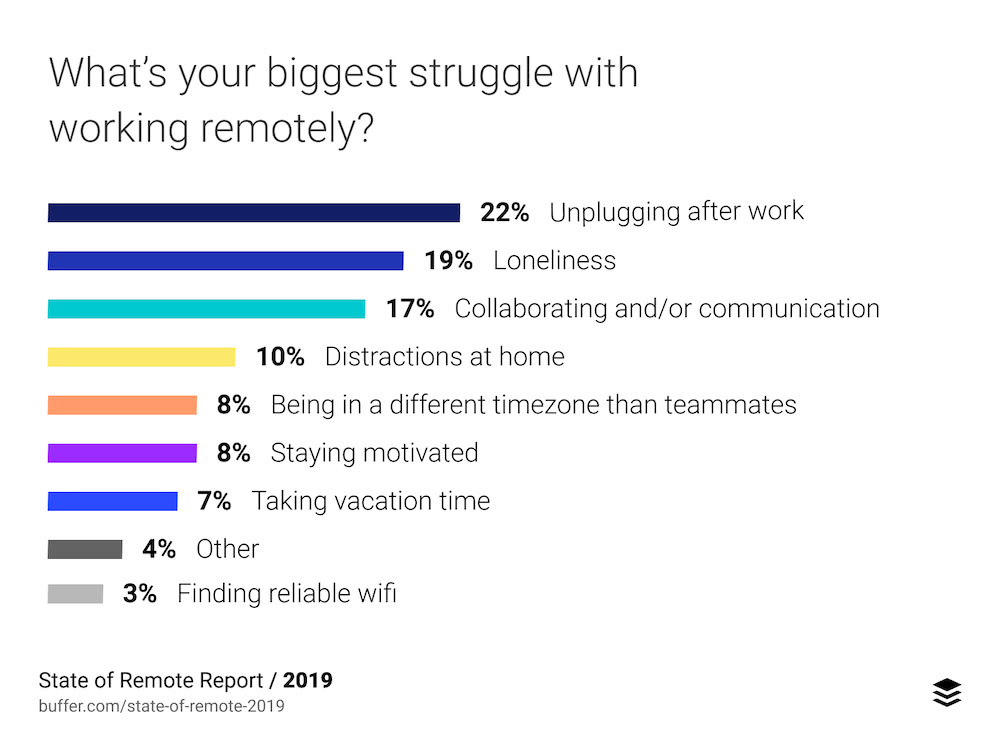
The top 4 issues with working from home as listed above are things we have worked very hard to combat at The Brag Media.
To tackle these work-from-home issues, we have implemented the following five apps to help our team through this difficult time. All have been extremely effective.
1. Tandem
This app creates an environment for your team which is the closest thing to working in a physical office. You can:
- Quickly talk to anyone by pressing their name (without having to "call" them)
- Create rooms, like in the real world, which you can work from and people can come in and out of the rooms as needed
- You can see what apps your team are working in and join them with a single click
- Screen share easily
- Interrupt meetings (like in real life). e.g. If I see there is an editorial meeting going on in the "Newsroom", I can enter that room at any time, hear what's being discussed in the meeting and join in or interrupt if there is something urgent happening.
2. Slack
Slack is something we have been using since day 1 at The Brag Media, even before work-from-home. Super-easy chat system that you can organise by project and invite people in or out of channels as needed.

Reporting from inside the Australian music business since '94.
It reduces emails dramatically.
Also I recommend disabling the @channel notification for all staff except managers, the key for Slack is to reduce the amount of notifications the team gets as much as you can.
3. Google Docs
Everyone knows what Google Docs are so I won't bore you with the detail. However, why it trumps all Microsoft alternatives in a work-from-home arrangement is you can update documents live, and everyone can see the changes as they happen.
Two people can work on the same document and update them together seamlessly. It's remarkable.
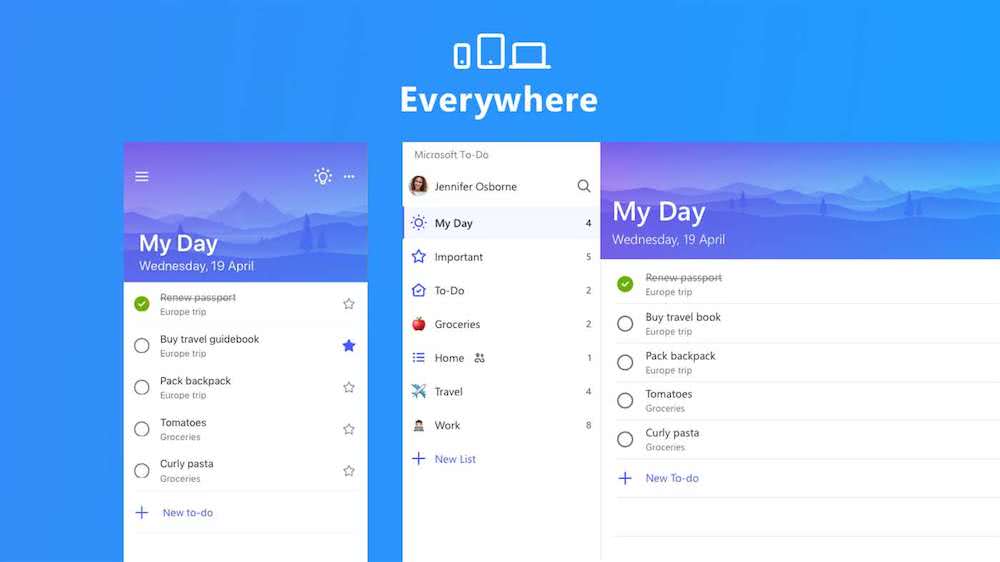
4. Microsoft To Do
A simple, yet effective to-do list. You can share your to-do list with your managers so your managers can do two things:
- Know what you are currently working on and your current capacity (i.e. they won't allocate you more work if it looks like you're already slammed)
- Add more tasks to you list with due dates so its clear what needs to be done by when.
5. Serene
This is an app I've only started using today so take this recommendation with a grain of salt. However, on first impressions it seems fantastic.
It is an app for Mac that helps you achieve maximum productivity every day. There are two key principles behind the app, both of which are backed by a series of scientific studies. First, Serene encourages you to set a single daily goal and stay focused on achieving that throughout the day. This is based on studies that show multi-tasking drastically reduces productivity while others point ongoing distractions and/or multi-tasking can even damage your brain.
The second key role Serene plays is blocking access to distracting websites and apps during work sessions while also silencing your phone. Separate studies find it takes 23 minutes and 15 seconds to get back on track after being distracted. This gives you an idea of how much time those email notifications can cost you throughout the day.
More from The Music Network
Reporting from inside the Australian music business since '94.
Get our top stories straight to your inbox daily by signing up to our Newsletter


